On 3.1:
In all, other than the time it took them to patch the servers (which didn't matter to me since I wasn't available to play until 9 server), I was impressed with the patch. Most of my addons worked, only a few gave errors, and when I clicked through the errors, they all worked as intended. I started in Dalaran, did the daily cooking quest, and picked up the new daily fishing quest. It took me to Sholazar which was nice since I got my Frenzyheart dailies done at the same time. I then returned to Dalaran, turned in the quest, and then flew up to Icecrown for the Argent Tourney.
On the Argent Tournament:
Pretty darn cool. I easily breezed through the intro quests, picked up the other dailies, and quickly earned 5 tokens. The quest to obtain 15 tokens will be done on Thursday, so it should be nice to see what opens up after that. Dueling on horseback is pretty sweet and the dailies take you all over Northrend. The only issue we had was after starting the Black Knight quest line and going to Westfall, when we tried to hearth back to Dalaran, the Northrend server was down and I had to call it a night.
On WoWMatrix:
Yesterday, news was released that WowMatrix had been blocked by both Curse and WowInterface. I completely understand the reasoning behind blocking WowMatrix, and, ultimately, it was the right decision to make for both sites, however, the way they handled it was completely wrong. They waited until patch day to block WowMatrix. They had been planning for weeks (if not months) on blocking the application, yet they didn't alert anyone to that fact. They gave no one a chance to prepare for the application breaking. The kept all the end-users in the dark and waited until the worst possible moment for everyone to break a vital application.
Like I said, I understand why they did it. Simple economics. WowMatrix made it so you didn't have to visit Curse or WowInterface to get your addons and they lose income because of that. There is no other reason other than simple $$$. However, again, like I said, the way they broke WowMatrix was despicable. They chose to break the application without providing any viable alternative. The Curse downloader obviously only works on Curse and is quite gimped and installs addons you didn't choose to install. As for WowInterface's updater, well...they don't have one. They'll gladly shut you out of their network, yet provide no alternative. Kudos to you guys.
So they shut down WowMatrix, which was a simple, efficient way to download addons without providing an alternative and they do so on the busiest day of the year. And what happens? Both sites crash or slow to a crawl. Gee, who would have seen that coming? Both Curse and WowInterface reported bandwidth drops of 30% and up, however, both were unable to stay up as people who used WowMatrix flooded their sites looking for updates, and, in most cases, not finding them due to poor search results, slow sites, and outdated addon listings.
On Achievements:
On Monday a few of our regular raiding team got together to do heroic achievements. Still working on that red drake and all...we decided to try the spider lairs, Azjol'Nerub and Ahn'kahet. After repeated wipes on Watch Him Die, we skipped it and proceeded to easily get Hadronox Denied and Gotta Go!. Not too bad. Over in Ahn'kahet, we easily got The Party's Over (Phosphorex had to sit that one out) and Volunteer Work. Respect Your Elders took us two tries, but only because we had a slight healing issue in the main room, but we got it done. Volazj's Quick Demise will have to wait as that is a very tough achievement. I think we'll have to all go in as DPS as I had troubles getting the healer down in the madness portion.
Of course, last night I earned Argent Aspiration and Dual Talent Specialization. I was a little disappointed to see no new achievements outside the Argent Tourney and Noblegarden. There are some smaller ones like for Dual Spec and for the new fishing dailies, but nothing fun like in the last patch. Oh wells, I think the Argent Tourney and upcoming holidays will keep me plenty busy.
On Paladins:
On Monday, I met a fellow blogger in the game after she saw my spam in trade chat. Please take a second and go say hi to Platezilla. She has some very cool updates to read and an awesome story about her death knight Velanora.
Thus ends my rants, tonight, more Argent Tourney fun, and maybe some tries at the Emerald Whelpling out in the Swamp of Sorrows. Oh, and perhaps some manual addon updating since WowMatrix doesn't work :(
Showing posts with label addons. Show all posts
Showing posts with label addons. Show all posts
Apr 15, 2009

May 27, 2008
A New UI
Not quite sure why I spent almost 6 hours yesterday designing this new UI, and not sure how it will hold up in a raid, but I'm pleased thus far and it should save a lot of screen real estate that was taken up previously by artwork and graphics. My first UI full post can be found here to see what I'm changing over from and then I've got a little here on how cluttered my UI has become. So, without further ado, here is my tentative "new" UI:
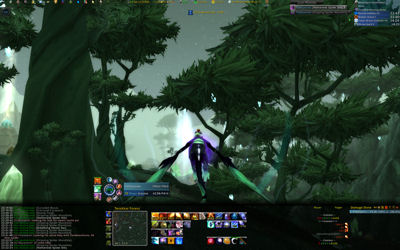
Right now it is a work in progress, but pretty far along. The bottom bar holds all the pertinent information I need (left to right): Chat (via Prat), Pots/Healthstones (via Bartender3), MiniMap (via SimpleMiniMap), Spells/Macros/Etc. (via Bartender3 & CyCircled) Quartz (not shown - above spell buttons), Omen (not shown since I'm not in a party), EavesDrop (CombatLog), and Recount(Damage Meters and more).
Above the black bar across the bottom of my screen I have three quick macro buttons - the top one quickly activates burst DPS via Icon of the Silver Crescent, Combustion, and Icy Veins. The next one down uses my Mana Emeralds via left click and conjures a new one via right click (will update this macro to destroy an emerald with less than three charges and summon a new one via a right click in the future). And then I've got my handy-dandy disenchant button.
To the right of the three macros is Cryolosis2. I haven't ever used it in the past, but it has been helpful in removing buttons from my bars. Rather than having all my teleport and portal spells on a bar, I can just click one of the buttons on Cryolosis which opens up more buttons which I can left click to teleport or right click to create a portal. There's also a buff button which gives me quick access to my AI/AB, mage armor/molten armor, mana shields, etc. So those are now removed from my bar. I also have it set up to have an invisibility and evocation button, but upon using those skills, I can't see how long they have until I can use them again (I have four buttons on my bottom bar right now which allow me to see the cooldowns remaining for those two spells along with the two in my macro - so I might just use those buttons and remove the two from Cryolosis).
Thought you can't really see it right now, I've switched over to Pitbull for my unit frames. Previously I was using agUF, but it is now "outdated" according to WowAce, I wanted to give Pitbull a shot. So far it's working well, I just need my party frame to be a bit cleaner (again, we'll see what happens tonight during the raid). As for my raid frame, well, I don't think I'm using Pitbull. I installed Grid which gives a quick overview of the whole raid so you can quickly glance to see the health and status of the raid and if it allows me to quickly buff up the groups, that's all I need my raid frame to do - again, it will be a learning experience tonight (if you look closely, you might notice I have spent NO time configuring Grid yet).
Across the top I have my standard FuBar installation - still need to make a few tweaks to it and then I have a new addon I have not used before - XLoot and XLootMonitor. XLoot allows you to easily link items to chat, see everything that dropped in one easy window, and just monitor the loot. XLootMonitor (which you see up there next to my buff bars) keeps track of who loots what - a pretty nifty little addon. And then there's ElkBuffBars in the top right. I shrunk them down from my previous installation and I'm quite happy with them thus far. Oh yeah, that little green dot next to XLootMonitor and ElkBuffBars is PallyPower so I can easily spy on which pally I need to bug for Salvation.
All in all, I'm pretty happy with the layout and it should hold up while raiding. I turned the casting bars of Pitbull off and I am using Quartz instead, so I'll have to see how that holds up and I've got a new window which allows me to see the target of my focus (never really used that before). Also, Cryolosis presumably can alert me when I have a few seconds left on a sheep and can also "tattle" on people who break my sheeps in the raid channel. Tonight is Gruul/SSC, so I'll have to see how the whole thing holds up while tanking Krosh, DPS'ing Gruul, and sheeping trash in SSC.
Things to do: Get Grid working, install tcg_tradeskills for FuBar, test everything in a raid environment...
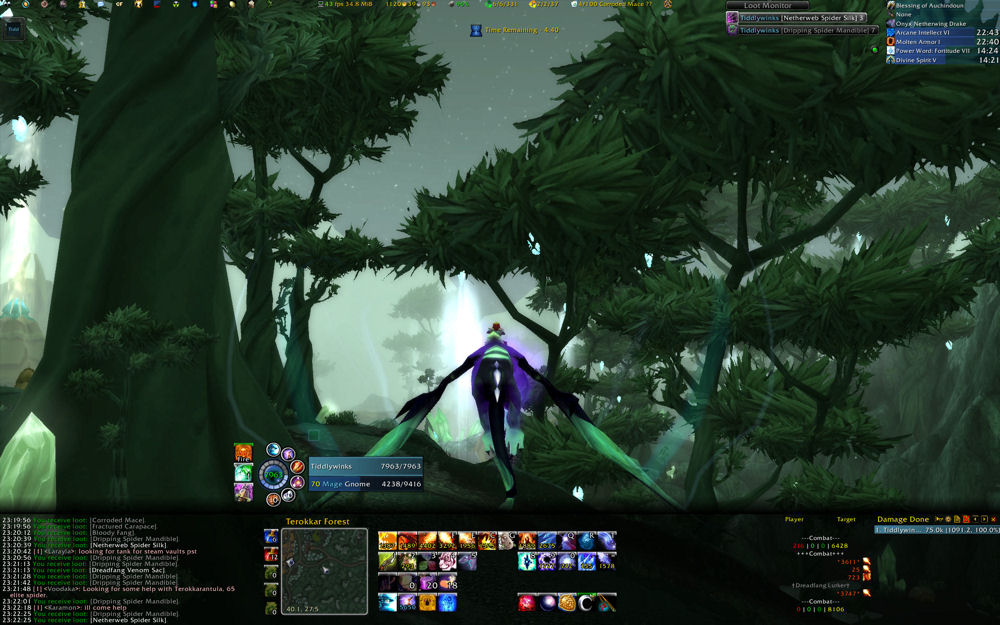
Right now it is a work in progress, but pretty far along. The bottom bar holds all the pertinent information I need (left to right): Chat (via Prat), Pots/Healthstones (via Bartender3), MiniMap (via SimpleMiniMap), Spells/Macros/Etc. (via Bartender3 & CyCircled) Quartz (not shown - above spell buttons), Omen (not shown since I'm not in a party), EavesDrop (CombatLog), and Recount(Damage Meters and more).
Above the black bar across the bottom of my screen I have three quick macro buttons - the top one quickly activates burst DPS via Icon of the Silver Crescent, Combustion, and Icy Veins. The next one down uses my Mana Emeralds via left click and conjures a new one via right click (will update this macro to destroy an emerald with less than three charges and summon a new one via a right click in the future). And then I've got my handy-dandy disenchant button.
To the right of the three macros is Cryolosis2. I haven't ever used it in the past, but it has been helpful in removing buttons from my bars. Rather than having all my teleport and portal spells on a bar, I can just click one of the buttons on Cryolosis which opens up more buttons which I can left click to teleport or right click to create a portal. There's also a buff button which gives me quick access to my AI/AB, mage armor/molten armor, mana shields, etc. So those are now removed from my bar. I also have it set up to have an invisibility and evocation button, but upon using those skills, I can't see how long they have until I can use them again (I have four buttons on my bottom bar right now which allow me to see the cooldowns remaining for those two spells along with the two in my macro - so I might just use those buttons and remove the two from Cryolosis).
Thought you can't really see it right now, I've switched over to Pitbull for my unit frames. Previously I was using agUF, but it is now "outdated" according to WowAce, I wanted to give Pitbull a shot. So far it's working well, I just need my party frame to be a bit cleaner (again, we'll see what happens tonight during the raid). As for my raid frame, well, I don't think I'm using Pitbull. I installed Grid which gives a quick overview of the whole raid so you can quickly glance to see the health and status of the raid and if it allows me to quickly buff up the groups, that's all I need my raid frame to do - again, it will be a learning experience tonight (if you look closely, you might notice I have spent NO time configuring Grid yet).
Across the top I have my standard FuBar installation - still need to make a few tweaks to it and then I have a new addon I have not used before - XLoot and XLootMonitor. XLoot allows you to easily link items to chat, see everything that dropped in one easy window, and just monitor the loot. XLootMonitor (which you see up there next to my buff bars) keeps track of who loots what - a pretty nifty little addon. And then there's ElkBuffBars in the top right. I shrunk them down from my previous installation and I'm quite happy with them thus far. Oh yeah, that little green dot next to XLootMonitor and ElkBuffBars is PallyPower so I can easily spy on which pally I need to bug for Salvation.
All in all, I'm pretty happy with the layout and it should hold up while raiding. I turned the casting bars of Pitbull off and I am using Quartz instead, so I'll have to see how that holds up and I've got a new window which allows me to see the target of my focus (never really used that before). Also, Cryolosis presumably can alert me when I have a few seconds left on a sheep and can also "tattle" on people who break my sheeps in the raid channel. Tonight is Gruul/SSC, so I'll have to see how the whole thing holds up while tanking Krosh, DPS'ing Gruul, and sheeping trash in SSC.
Things to do: Get Grid working, install tcg_tradeskills for FuBar, test everything in a raid environment...
Mar 15, 2008
The Raid UI
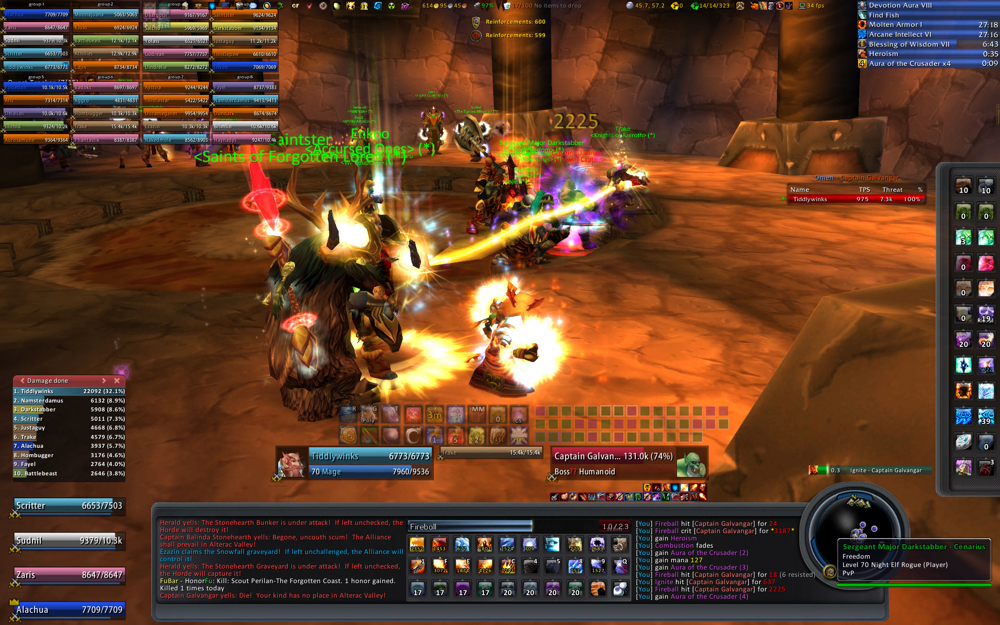 ((Click to enlarge - caution: 1 meg picture))
I've seen a bunch of people post their UI's recently, so I thought I'd share mine. The main UI is based on Taeo's wonderful graphical setup. From there I have changed a lot, added a lot, and kept just a little the same.
In the upper left hand corner, I have quick access to all 40 members of a raid. Using Aloft, I am able to color code every player in the game and these bars also change colors based on their status (e.g. if they need to be decursed). From there, down the left side, I have the Violation damage/healing meter and below that, my party members. Of course, the 40 raid bars only appear if I'm in a raid. Otherwise, I just have my party bars down below.
Right in the middle of the screen, the place I'm looking at most times, is my, as I'll call it, Focus Bar.

On the top half of the bar, I have two rows of buttons. These aren't used all that often, but does give me quick access to healing and mana potions, healthstones, and trinkets. Directly to the right of those buttons is Decursive. Decursive gives me one click access to decurse and polymorph players (in case of mind control). They are automatically sorted in my predetermined priority order (Warriors, Druids first as tanks). Below the two button bars is my character bar which obviously tracks my HP and Mana and then under Decursive is my target's bar. Right in the middle there is the target of my target. If I ever see that turn to me, I know I'm in trouble and I immediately hit "R" (my Ice Block).
Below the focus bar is my main window. To the left is Guild chat, Raid chat, and when in cities, General and Trade chat. To the far right is HitsMode formatted combat text. In the middle, I have the wonderful Quartz casting bar and beneath that, three rows of buttons. The bottom row has all my teleports, portals, and food/water conjuring.

As you can see, I have little numbers on every spell courtesy Dr. Damage. This in-game theorycrafting addon automatically updates how much damage each spell should do without a crit based on my current stats and buffs. It's pretty cool to watch these change as I get different buffs or use trinkets.
Of course, I also have the minimap, but it's not cluttered with any buttons around it thanks to FuBar. The only icons that show up are the new mail icon and the battlegrounds icon (as seen in the shot above). The Simple Minimap addon allows me to zoom in and out on the map with the scroll wheel on my mouse, allows me to click and drag to pan around and allows the cool skinning as seen in my screenshot.

Above my minimap, I have Sorren Timers. They don't track much, but the two most important things the timers do track are my spell steal for when I'm tanking Krosh Firehand and my sheeps.
Speaking of sheeps, I use a custom macro:
#show Polymorph
/clearfocus [modifier:alt]
/focus [target=focus,noexists]; [target=focus,dead]
/cast [target=focus,exists,harm]Polymorph
Basically #show Polymorph shows the Poly icon and tooltip when I mouse over the macro.
/clearfocus [modifier:alt] clears whatever my focus is if I am holding down the Alt key.
/focus [target=focus,noexists]; [target=focus,dead] will focus on whatever mob I have targeted only if my previous focus no longer exists or is dead.
/cast [target=focus,exists,harm]Polymorph will cast Polymorph on my focus as long as it exists and is unfriendly towards me.
And that's it. I have my Poly macro bound to my "G" key and before going into any fight, I just target my Poly target, hit "G" to focus on it and then target my DPS target. Then, all I have to do is hit "G" again to Polymorph my focus whenever it is in range and I after that spell is cast, I already have my DPS target targeted and I can start doing damage. If I need to resheep, I don't have to find my sheep target as it is already focused - all I have to do is hit "G" and it sheeps the focus as long as it is in range. If the sheep target is dead, it will focus on whichever mob I am currently targeting. It's a very useful macro and even though I put off using a Poly macro for a while, I'm now very happy I'm using it as the focus modifier is a godsend.
To the right of Sorren Timers are my utility buttons - at the top, water and food, underneath 2 different versions of healthstones (the highest healthstone always gets placed on my "Focus Bar" as well), mana gems (conjur mana gems just to the right of the "for use" mana gems), mage food (with Ritual of Refreshment to the right), bandages, slow fall, mana shield, evocation, molten armor, mage armor, AI, hearth, disenchant, and then two utility buttons. The one in the very lower right is my "3" button. It's used for bombing runs, booterangs, and other such quests. I just replace it as I go and it gives me easy access to an item in my bank while out and questing.
Above Sorren Timers and to the left of my utility buttons is Omen. The best threat meter on the planet and the one addon I could not live without. Above Omen are my buffs nicely categorized and tracked by Elkano's Buff Bars. They keep track of stacking buffs, debuffs, and weapon buffs. It also has my "tracking" skill there too which I can easily change at any time.
And finally, across the top is the aforementioned FuBar. Starting at the far left I have tons of buttons for various addons I use. They provide quick access to configuration menus for Violation, BigWigs, and other stuff. In the middle I track my gold, my durability, and my trash can. On the right I have my location, number of friends online, number of guildies online, reputation tracker, tcgTradeskills, and information about my connection, FPS, etc.
As you can see, I like to keep the middle of my screen clear. I used to use a heads up display, bu just prefer to have a clear, unobstructed view of the battlefield. I use enemy bars so I can quickly pick them out if they get close to me (in the screenshot above, Galv is too far away to have a bar above him), and I just like to have an open view (the view is much cleaner without a 40 man raid in the upper right).
If you have any questions, or comments, please leave a comment and I'll respond ASAP.
Mar 9, 2008
375 Fishing
Today, after quickly running some Wintersaber and Timbermaw rep, I did my dailies and then went fishing. Did some quick fishing in Nagrand and got to 370 and then decided to test my luck fishing for Mr. Pinchy. I went over to Terokkar and started fishing the Highland Schools. After fishing up 60 Furious Crawdads, I called it a night and reveled in my full skills list.
Speaking of which, time for a look at a great add-on I use. It's a Fubar plugin and is available at WowAce.com - tcg TradeSkills. It tracks tradeskills across all characters and servers if you so choose and also, and most importantly, tracks my cooldowns related to tradeskills. So right now I have it set to remind me every 30 minutes that I need to go make my cloth. As you can see in the screenshot below, both Spellcloth and Primal Mooncloth still waiting on cooldowns, while my Shadowcloth cooldown is 12 days past.

Speaking of which, time for a look at a great add-on I use. It's a Fubar plugin and is available at WowAce.com - tcg TradeSkills. It tracks tradeskills across all characters and servers if you so choose and also, and most importantly, tracks my cooldowns related to tradeskills. So right now I have it set to remind me every 30 minutes that I need to go make my cloth. As you can see in the screenshot below, both Spellcloth and Primal Mooncloth still waiting on cooldowns, while my Shadowcloth cooldown is 12 days past.
Mar 4, 2008
Arena Layout and Letdown
On Sunday night, Panoply, Vetarra, Mercreus and I got in 8 arena games before we lost two people and our 3v3 team, Aspect of Frost Wrath had to call it a night. I had hoped to get two more games in to get my weekly points, but after waking up last night, both Panoply and Vetarra were in SSC and our 5th member was not online. So it seems that we ended up two games short of the minimum number of required games and I will stay one point short of my pants.
Speaking of arenas though, this is my new arena layout:
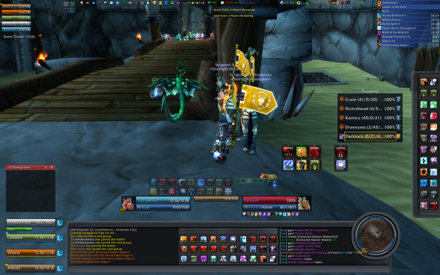
Not much changes from my standard raid layout as I have my grouping in the upper and lower left side, I have my trinkets and gems/pots in the middle with Decursive just to the right of those rows. The only thing that changes from my Raid UI to my Arena UI is the extra large buttons on the right side. I have my frequently used Arena buttons that I rarely use otherwise - including my PvP trinket and Escape Artist. And then, the best part of the whole thing, Proximo. Proximo is a must have and shows me the other team, allows me to quickly switch targets and also will allow me to set my focus for sheeping and then target my DPS target.
In the shot above, we won the game as we were able to lure the shamans (way too many shamans) away from their totem jungle. Of course, I'm sitting there with my Jubling out and antennae on my head.
Speaking of arenas though, this is my new arena layout:
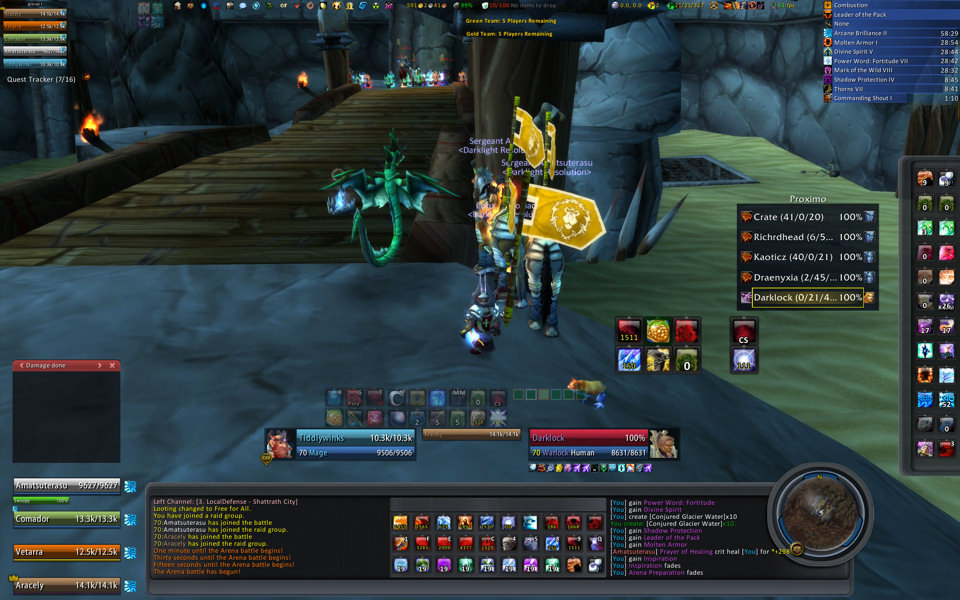
Not much changes from my standard raid layout as I have my grouping in the upper and lower left side, I have my trinkets and gems/pots in the middle with Decursive just to the right of those rows. The only thing that changes from my Raid UI to my Arena UI is the extra large buttons on the right side. I have my frequently used Arena buttons that I rarely use otherwise - including my PvP trinket and Escape Artist. And then, the best part of the whole thing, Proximo. Proximo is a must have and shows me the other team, allows me to quickly switch targets and also will allow me to set my focus for sheeping and then target my DPS target.
In the shot above, we won the game as we were able to lure the shamans (way too many shamans) away from their totem jungle. Of course, I'm sitting there with my Jubling out and antennae on my head.
Subscribe to:
Posts (Atom)