Showing posts with label ui. Show all posts

Apr 14, 2010

Tukui and Updates

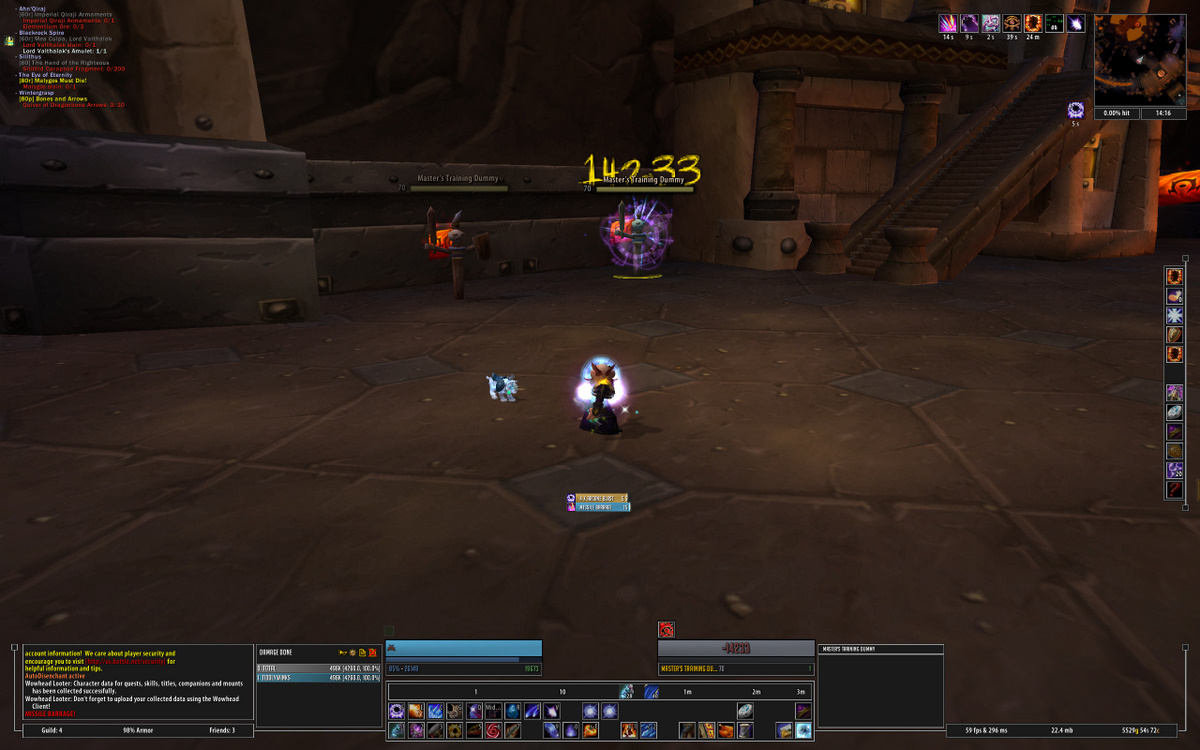
Obviously this poor little blog has been set on the backburner as I work on other projects and pursue new job opportunities, but Tiddlywinks is still going strong. Yesterday, Tukui was featured on both NoStockUI.com and WoW.com and I was intrigued. It was functional, minimalist, and clean. So I backed up my Cache, WTF, and Interface folders and dove right in. After some tweaking, installing some addons of my own, and playing around with all the different features, I think I'm to a point that will work for me. I'm still missing my "DPS Bar" - the bar that held my All-in-One macro for DPS and showed the cooldowns for all my DPS boosters, but I will figure a way around it.

So for now, here's what we've got. It's the standard Tukui, tweaked a bit. I've added shading to the background of the chat box, installed both Recount and Omen and skinned them to integrate with Tukui, and I tweaked the code for Tukui to display my current spell hit % (which was working when I had last tried it, but it is not working now for some reason - hence the 0.00% spell hit under the map).

I also installed Cork, Decursive, MageNuggets (solely for spell steal info), MonkeyQuest, Overachiever, Power Auras (not yet set up), Scorchio2, and Sexy Cooldown. I had never used Sexy Cooldown in the past because I had my DPS bar, but now without it, I think Sexy Cooldown will do the job and allow me to use my cooldowns better. Since I can now time them to coincide with a Black Magic or Lightweave proc, I can hopefully get a little more DPS out of them.

Should you have any questions, just leave a comment.

Jan 26, 2010

The New-New UI

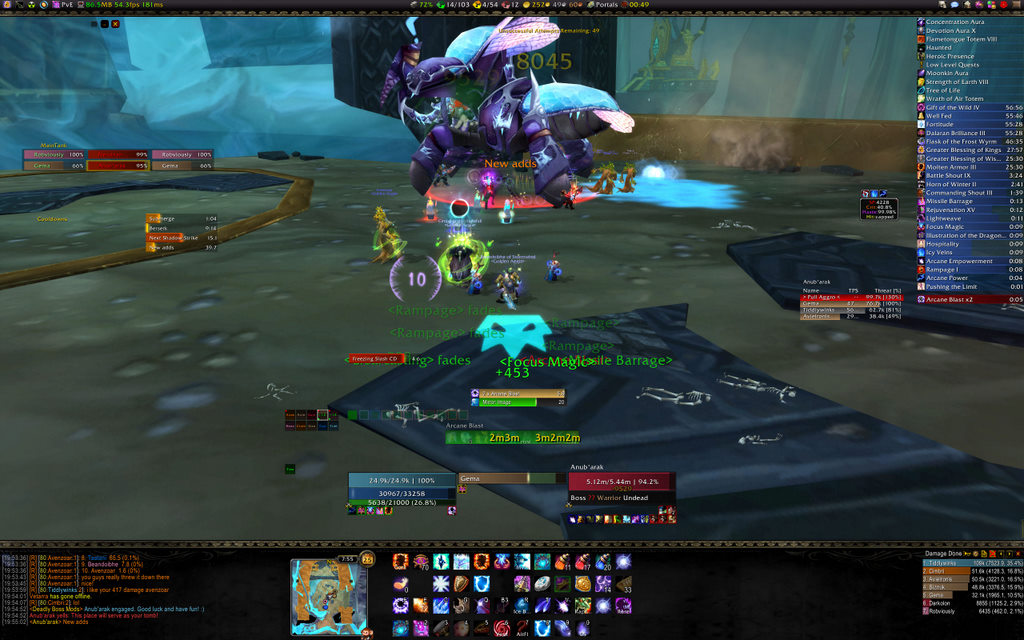
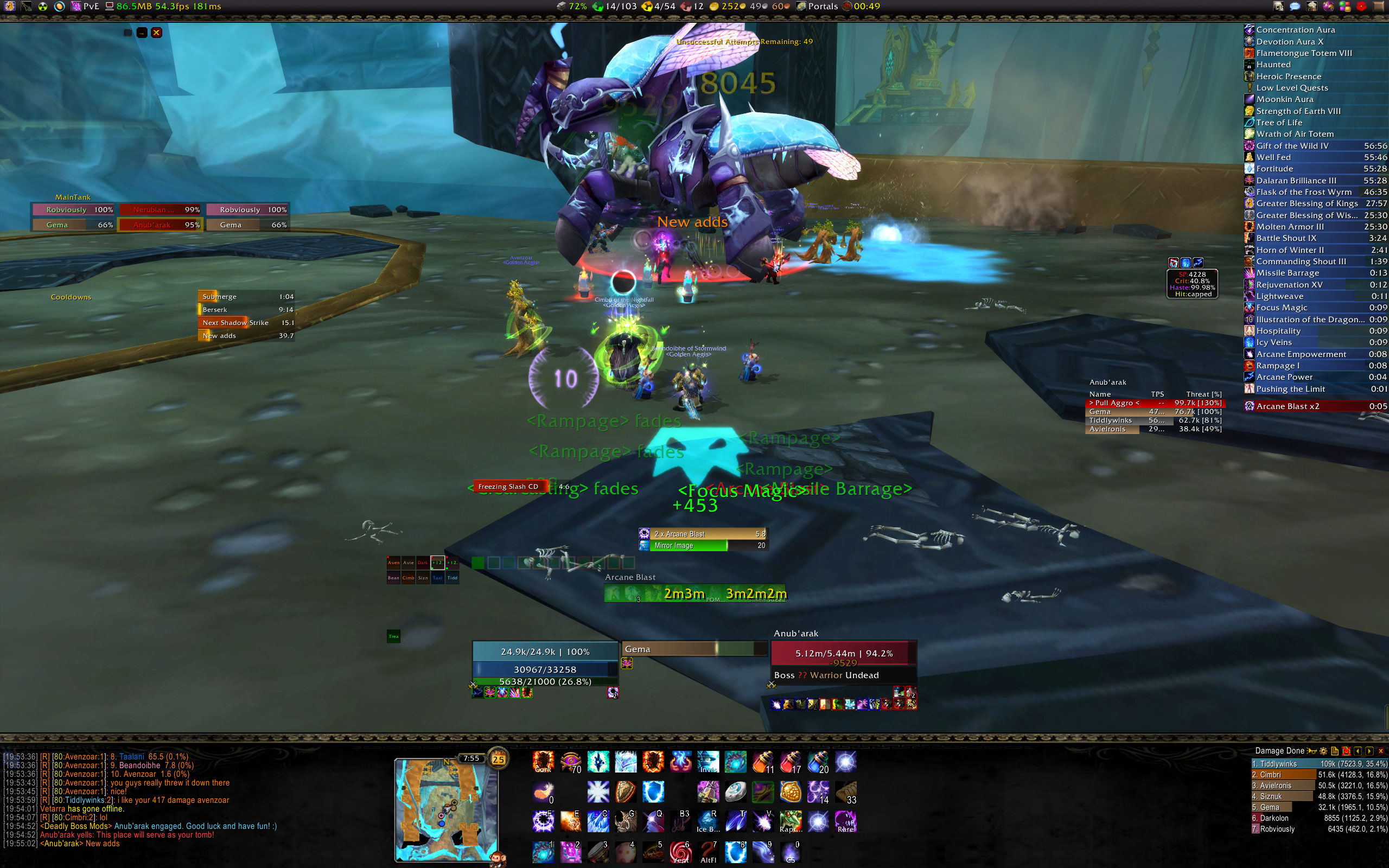
I haven't done a UI post since March, 2009 and when I run random heroics, I've been asked a couple of times how I track cooldowns and such to maximize my DPS. So here it goes. This is my current UI.


(click image to enlarge, click here for full size (warning: 775kb - 2560x1600))

So, let's start at the top. Across the top of the screen, I use ChocolateBar to display all my broker addons. Since FuBar is no longer the bar of choice as most plugins are using the broker display, it only made sense to switch. From left to right, we have:

  • BuffEnough - explained later
  • Cork - explained later
  • Decursive - to be explained later
  • Omen - explained later
  • Broker_BlizzEquipmentSet - an easy way to switch between my 3 defined equipment sets - PvP, PvE, and Naked
  • Broker_CPU Memory - your standard performance monitor
  • Broker_repair - a standard repair status
  • Broker_GemGuild - an easy way to see who is on in your guild
  • Broker_GemFriends - the easy way to see which friends are on
  • Broker_AltGuild - shows you who is on in a second guild of your choosing
  • Broker_Money - how much money you and your alts have
  • Broker_Portals - a one click stop for all portals, teleports, and other means of transportation (e.g. Dalaran ring, Argent Tourney Tabard, Hearthstone)
  • Broker_Wintergrasper - shows you who holds Wintergrasp, how long until the next battle, and best of all, can be configured to announce to yourself, or more (I have it announcing to the guild) when Wintergrasp starts (I announce at 15 and 5 minutes until the next battle)
  • HeadCount - I used to use this to track loot during our Gold Team 25 man runs, but I am no longer the loot master, but I still use it to track raids - a great tool
  • Prat - your standard chat modifier - I have found that it also handles alt names as well which has been awesome
  • Bartender4 - standard bar manager
  • Ora2 - raid manager (tanks, cooldowns, ready checks)
  • Grid - more on this later
  • GatherMate - tracks gathering nodes on your map
  • Chocolate Bar - your bar config

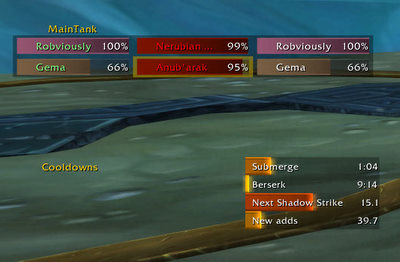
So now we can look at the left side of the screen. I keep it generally uncluttered. The less clutter on the screen, the better. Since our guild hasn't made the move to Ora3 yet, I'm still using Ora2 and it serves me well. I have my main tank frames and below that I can track cooldowns such as battle resses and other class-specific cooldowns. To the right of the cooldowns I have my Deadly Boss Mods timers. Towards the middle of the screen, you can see where they go when they are close to occurring, but we'll get to that later.

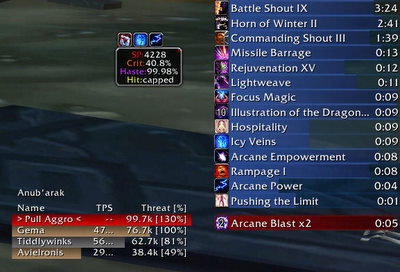
Over here on the right, we have a couple of important mods. First up is one I've been using for ages - Elkano's BuffBars. These buff bars are amazing and keep everything in an easy to see spot. I absolutely love them and have found nothing comparable. Next, there's this little box that shows my spellpower, cirt, haste and hit rating at that exact moment. This box is courtesy Mage Nuggets. Mage Nuggets has - as the name implies - many nuggets that are useful to a mage. I use this nugget and one other and have turned the rest off. It's pretty cool to be able to just glance over at any given point and see that my current SP, with all buffs from all raid members is 4,228. What's even more fun is watching my haste move up and down. Fully raid buffed, I'm sitting at about 41% haste. With Icy Veins, Pushing the Limit (2 piece T10 bonus), and Wrath of Air Totem, I'm at 99.98% - with Heroism, it's even better (I have another screenshot with heroism, but no Icy Veins which has me at 116.65% haste). And finally, we have Omen - it's THE threat meter to use. However, it seems like I only really need to use it in random heroics these days as the tanks in my guild rock.


(click image to enlarge)

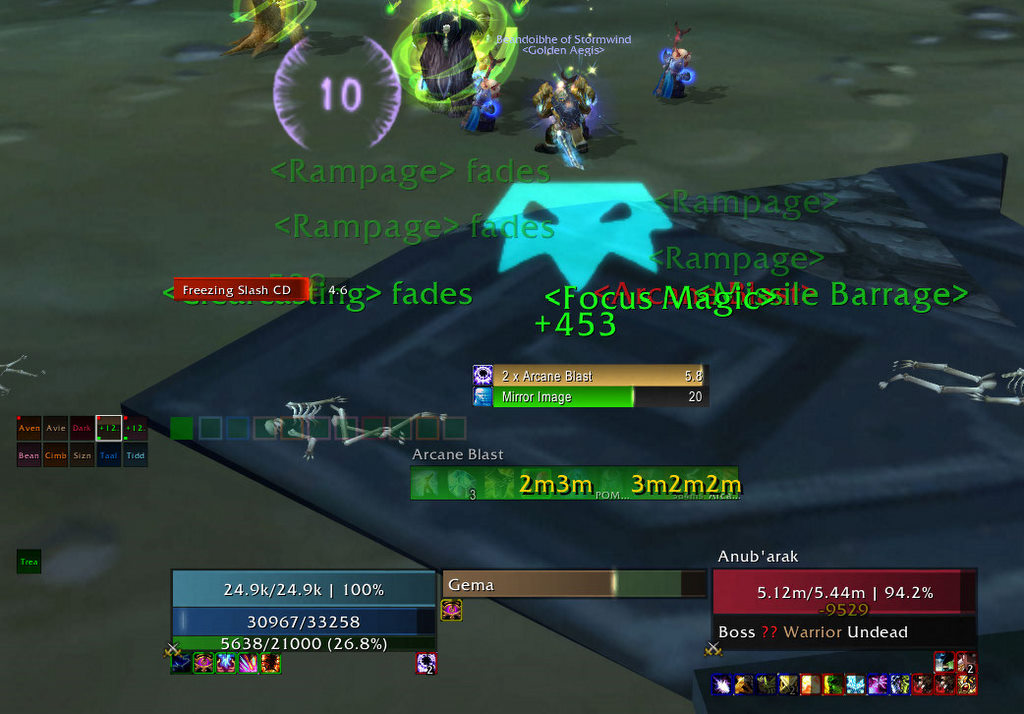
Now, to the guts of the UI - the middle of my screen where all relevant information pops up and which commands my focus 99% of the raid time. At the very top, middle is me. I have everything spread out around me - it makes it easy to keep my situational awareness up since my eyes never have to stray far from the middle of the screen. Around me, I use Power Auras to give me information that I need the exact moment I need it. The ( 10 ) that you see shows how long I have left on my Icy Veins. Below it, in yellow will pop up a similar counter that shows how much time I have left on my Heroism. These two numbers are extremely important because if you are having mana issues and need an Evocate, if you trigger it with 1 second to go on either Icy Veins or Heroism, it benefits from the haste buff for the full duration of the channel. This obviously reduces your cast time and generates mana in the fastest way possible. The skull-like looking thing directly under my feet is my Missile Barrage alert. It tells me that I have Missile Barrage, and I need to use it ASAP. With 2 piece T10 giving that awesome haste bonus when a Missile Barrage is used, the current theorycrafting advises you use your Arcane Missiles with 2, 3, or 4 stacks of Arcane Blast - in essence, just use it as soon as you can to activate the hast bonus which will haste your missiles and two arcane blasts after the missiles.

Continuing down, we have Scorchio 2 to track my Arcane Blast stacks and other good information. It's always helpful to know exactly when your mirror images will fall off so you can start casting an Invisibility if you are above the tank's threat for some reason. Off to the left, I have my Grid setup so I can at a glance quickly determine who is still alive in the raid or who really needs some healing. It's always fun on a decimate to see everyone drop to no HP and then watch as some die while others are healed up. It's not necessary to really use this, but I just like to monitor the raid when I have time. And, if I can see 90% of the raid is dead, I can pop Invis and maybe stay alive rather than wipe. Directly to the right of that is a little green box. It seems to blend into Decursive, but it's not that...it's BuffEnough. It turns green when you have all the buffs you need. Missing a well fed buff? It'll be red. No flask? Red. No Kings? Red. It's great and helps me if I've forgotten something during the buffing. So next to that, I've got Decursive. Just a quick click here and there to decurse when needed or to sheep that mind controlled target and I'm set. It's a great addon and one a mage might not think to have, but it just makes decursing so easy, there's no reason not to have it.

And now that green bar with all the cooldowns in the middle of it - what this is is a couple of things layered on top of each other. Underneath the green bar, we have a simple Bartender4 bar. This has all my most frequently used items. From left to right, we have: Evocation, Mana Gem, Escape Artist, Talisman of Resurgence, Icy Veins, Presence of Mind + Arcane Blast, Mirror Images, Arcane Power, and then the all-in-one button. The far right button is my macro that activates everything but POM+AB (since you can't use it at the same time as Arcane Power). So with just one click I can activate them all, or if two are off cooldown, I can activate those with one click. It allows me selective use of my cooldown abilities or use of them all at the same time. It's great. Overlaid on top of that is my Quartz cast bar. So as I'm casting, the cast bar shows up there, and I can easily see right under my cast bar which abilities are ready to be used. Why spread these items out when you can stack them and save room? The Quartz cast bar is amazing since it allows me to get a good idea of how my latency is affecting my cast timing which allows me to queue casts in a timely manner.

Lastly, at the bottom, we have your standard Pitbull unit frames. I have mine, the target's target, and my target as the ones that are shown all the time. Using my sheep focus macro, I'll have the focus target show up to the left of my target with my focus' target above the focus bar. To the right, my pet (if I'm controlling a pet or machine) shows up with my pet/machine's target above that. It all works out quite nicely.

Along the bottom, it's pretty standard - from left to right I have - my chat windows (all nicely formatted by Prat), my map (the awesome SexyMap), more Bartender buttons, a large blank space (which actually has more buttons that only show up on hover), and finally, Recount damage meters. Just used for my own personal tracking - because I hate nothing more than someone showing off because they just AOE'd the best on a trash pull - read here for a wonderful article on Why I Hate DPS Meters.

So that's pretty much it - however, there's some things missing. Right above my chat box, if I have to buff someone, Cork will alert me to that. It tells me to give Dalaran Intellect to someone (maybe just one person died on the fight), reminds me if my Molten Armor, and (though it doesn't work perfectly), reminds me to put Focus Magic on another mage.. It's a great little addon. I also use the Mage Nugget that pops up only when the target has a spell I can steal. It's lead to some great discoveries - like in Halls of Stone, a nice buff you can steal called Arcane Haste. I use it mostly for the Deathwhisper encounter, but it's fun to see what other spells are out there to steal. Other addons I use but which don't show up on the screen:

  • _NPCScan - alerts me when a rare mob is found
  • Ackis Recipe List - helps the compulsive collector side of me figure out which recipes I still need to obtain
  • Align - helps me get my screen all lined up perfectly
  • Auctioneer - if you don't know what it is, I can't help you...
  • Mapster - a great replacement for Cartographer which stopped working
  • Gather Mate - used with Mapster to track gathered nodes
  • Map Notes - as it sounds - notes for the map to be used with Mapster (or any other map addon)
  • Gymnast Tooltips - allows me to move the tooltip to the exact position I want it (lower-right just above Recount)
  • MonkeyQuest - the best way to track your quests (hidden in the upper-left corner while raiding)
  • OneBag and OneBank - all your bags and bank slots in one frame
  • Overachiever - THE way to easily browse achievements
  • Sunn Viewport Art - gives me the cool artwork around my top and bottom viewports
  • XLoot - the best way to track loot when used with XLootGroup, XLootMaster, and XLootMonitor. I love it.
And with that, my UI update is complete. Right now I'm extremely happy with my UI and don't plan on making any major changes in the days to come. Later today, when the maintenance boss is gone, I'll post the macros I use while raiding.

Jun 16, 2009

The Updated UI


(click to enlarge)

Building upon my last UI upgrade, I made some changes and moved some items around and have cleaned my UI up a little bit.

First off, I changed all bar textures from "Blizzard" to "Flat" - it just looks cleaner and information is easier to see. Next, I redid the "center" of my UI by rearranging some items.

This is my old "center" UI setup:


From top to bottom, you have Scorchio, Decursive, Quartz Casting Bars, Pitbull Unit Frames, and Bartender bars (under my unit frame).

This is the new "center" UI setup:


From top to bottom, you have Scorchio, Decursive, a Quartz casting bar ON TOP of a Bartender bar, and then Pitbull unit frames.

Firstly, you'll notice the cast bar. Underneath, you'll see icons. I've set it up so my casting bar is directly on top of a bartender bar that holds icons for all of my spells and items that are on cooldowns. I did this because I am usually watching my cast bar to chain spells together and this way I can see directly underneath it which spells are ready to go.

You can also see I moved the cast bar timer up above the bar and the spell name below the bar - a theme I followed throughout the new setup. Looking at my unit frame, you'll notice it's now centered and shows me a little more information. In the old unit frame, it said 80 Mage Gnome. Well, I already know that. So I got rid of it and can clearly see my mana. On the target unit frame, I have moved the name of the enemy I'm targeting up above the unit frame (Here: Dark Rune Guardian). I ran into issues a lot of times because I couldn't see the enemy's full name that I was targeting. In my old shot, all I could see was "Kel'Thuz..." There used to be no way for me to tell the difference between a Dark Rune Guardian or a Dark Rune Watcher without manually targeting the unit. Now I can tab target through a pack and pick the one I want.

Additionally, in my old unit frames, you cna see the "Frostbolt" that Kel'Thuzad was casting. In my current setup, you still can, I just didn't screenshot it. The new casting bar overlays the "Dark Rune Guardian" text and shows the cast time on the far right of the cast bar. Works perfectly and saves space.

Again, you see Decursive and Scorchio right there in the middle of everything as I love using these addons. They provide pertinent information right where I need it.


Another major change I've made is I've switched from the Blizzard provided raid frames to Grid. I used Grid back in the day and recently reinstalled it to minimize screen usage for the party/raid. I don't need to know much about what everyone else in the raid is doing, just if they're in range, and if they're alive. I can see diseases and other stuff I don't really care about, but it's funny to see everyone's life drop as Kolo wipes us out.

Those are the main changes. I removed some other action bars I don't need and next to my Grid you can see an extra chat box I use when master looting our 25 man raids. It just tracks raid warnings and whispers. As it stands now, I really like my main "center" screen. I'd like to move Omen down to mirror grid, but when I have focuses, they show up next to my target, and above them, I get my focus' target to show up.

Let me know if you have any questions in the comments.

Mar 25, 2009

The Newly Updated Raid UI

So, after a bunch of tweaking and moving things around here it is:
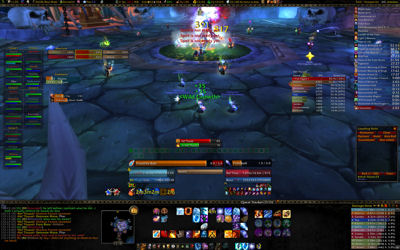

It's pretty similar to the UIs I've used in the past, but a few small changes have been updated. Across the top is the standard FuBar (note: since the screenshot, I've collapsed most of the FuBar plugins to icons only), with a flight timer, boss mods, decursive, etc. There's a gold monitor, item repair status, bag space, friends online, guild members online, grey items to drop, faction tracker, and tradeskill tracker.

At the bottom I've got my chat window on the left, a simple map, button bars, and then damage meters on the far right. Nothing too outrageous. Ignore the quest tracker down there - it has since been replaced by another quest mod. Just too many issues with BEQL.

Over along the left, I have quick access to all my party members and Ora2 tank setups, cooldowns, and then deadly boss mods sit over there until they get closer to expiration and then they move to the middle right next to Scorchio. It's nice to just use the standard built-in raid UI to pull out the groups. Gives me a quick overview of who is alive, dead, or dying.

In the middle it gets a little complicated...
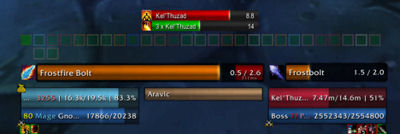

At the top is Scorchio - an amazing mod that tracks my living bomb and scorches on the target. I don't know what my DPS would do without it. The buttons below are Decursive and allow me easy decursing and sheeping during mind controls. There's a little green box you might be able to see over to the left of Decursive - that's BuffEnough - another great mod. Turns green when you are completely buffed, turns yellow when buffs are about to expire, and turns red when buffs are missing.

Below the Decursive boxes, there's Quartz for my timer bars. Here you see me catching Frostfire Bolt while Kel'Thuzad is casting a frostbolt.

Underneath that, I'm using Pitbull for my other panels. It's a pretty simple setup using the standard "Blizzard" shading instead of the "BantoBar" it was using before. It's me on the left, my target on the right, and the target of my target in the middle (thankfully it's the tank here). If I'm using a focus, that appears next to my target on the right and my focus' target appears above it. If I have a pet, it appears to the left of my name and my pet's target appears above it. Both the focus and the pet have their own Quartz cast bars.

Over on the right, we have Omen to monitor threat (I had tried placing it down next to the damage meters, but I need to watch it too much to have it down on the bottom of the screen, so there it is, right in the middle on the left). Then we have Elkano's Buff Bars going down the right side and LootHog beneath it. I have to run LootHog because, as you may have noticed on my character bar, I'm the loot master. Yay!

Other miscellaneous things: Sunn Viewport Art is amazing. It provides the nice backgrounds behind my top and bottom bars and also adjusts my viewport so my video card doesn't have to render graphics where I don't need to see. Which gives a few FPS boost I'm sure. I'm pulling 21 fps in the screenshot above - that's about as low as it goes during normal 25 man raiding. Thank you nVidia GTX 260.

Oh yeah, I use the built in scrolling combat text with arcs to move things up and away from my character. I found I needed the arcs because sometimes death knights or others spam abilities that cause lots of scrolling combat spam, so this works the best.

Now, to macros...not too many, but some that I couldn't live without:
#show Polymorph
/clearfocus [modifier:alt]
/focus [target=focus,noexists]; [target=focus,dead]
/cast [target=focus,exists,harm]Polymorph (Turtle)

Sheepage FTW. Bound to "G" key. Target my sheep target and hit "G" - if in range, it will set focus and sheep. If out of range, just sets focus. Now I have my sheep target focused and on screen at all times (next to my target as I stated above) and I can see when it breaks, or if it changes targets. If need be, I can just switch sheep targets with an ALT+G combo. The sheep will also change without the ALT modifier if my previous sheep focus is dead or doesn't exist anymore.

/stopcasting
/cast counterspell

I know it's simple, but it's necessary. I have it bound to the scroll down on my trackball scroll wheel. It allows me to quickly silence anyone, even if I'm casting something already. Works like a charm.

/cast [button:2]Conjure Refreshment
/use [button:1]Conjured Mana Strudel

My standard eat strudel button. Right click to conjure food, left click to eat. Easy, but effective.

#FIRE
/use [button:1] Mana Sapphire
/cast [button:1,target=player] Combustion
/stopcasting
/cast [button:1,target=player] Icy Veins
/stopcasting
/cast [button:1] Mirror Image
/stopcasting
/cast [button:2] Conjure Mana Gem

My newest one. I love it. All-out-DPS in one click. Uses my Mana Gem for a DPS bonus (thank you two piece tier 7), Combustion for extra crit, Icy Veins for fast casting, Mirror Image for a little extra DPS (not much, but it's something), and then lastly, if I right click, it conjures my mana gem. By default, because "Mana Sapphire" is first in the rotation, it shows me how many charges I have left and the cooldown on the mana gem.

As you might be able to see in my overall screenshot, it's right below my name plate. But to the left of it, I have individual buttons for Combustion, Icy Veins, Mirror Image, and the Mana Gem on its own. Since they all have different cooldowns, I have access to all of them individually to maximize DPS - though I just love hitting the one button at the start of a fight to get that DPS flowing.

/stopcasting
/cast Ice Block
/stopcasting
/cancelaura Ice Block

Another pretty simple macro, but it is bound to "R" and allows me to cast Ice Block quickly and easily. It cancels any spell I might be casting and throws me in an Ice Block. Then, quickly and easily, if I hit "R" again, I get out of my Ice Block. Comes in handy when the threat dissipates and I want to get back to DPS, or in PvP when people have Ice Block timers, I can break early and surprise them.

#showtooltip speckled tastyfish

This one I used over the weekend to allow me to see how many Tastyfish I have in my bags during the fishing tourney. Simply brilliant, thanks El's Anglin!

Of course, if you have any questions, suggestions, or ideas, let me know as my UI is constantly evolving.